Now that I have more time to do personal stuff, I wanted to start by doing a one character dialogue test. What I wanted to get out of this is learning a new workflow, try out some new techniques, and of course, keep on improving. 😉 I tend to burden myself with other parts of the creation process (modeling, rigging, etc.) and while it’s good to have knowledge of rigging, I should really focus on animating.
I started out by looking for some interesting dialogue from The Daily .Wav. I found a clip from “It’s a Wonderful Life”, which I admit I’ve never seen in its entirety (my boyfriend totally chewed me out about this.) I really love the volatile tone of voice in the clip and thought it’d be fun to try something with such intensity. Afterwards, I shot some reference and did some planning:
)
I tried to mimic the blocked/stepped approach to animating in 3D where you set a key on every controller on every keyframe you make. To facilitate this in 3dsMax, I changed the option of “Default In/Out Tangents for New Keys” to stepped. You can find it right below the timeline on the main UI. I also used the “Key Mode Toggle” (which is that pair of arrows next to the right of “Key Filters”) when I needed to jump from pose to pose with my arrow keys.
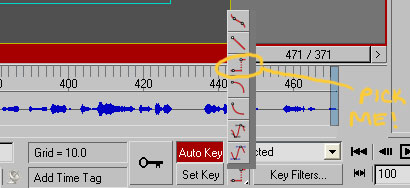
Working in this fashion so far, I have to say it’s a lot nicer than the PC distracting you with its ‘tweening. It also made me more conscious of posing, which is one of the major things I want to work on within animation. To keep myself in check, I followed Victor Navone’s advice and made sure there was a key at least every 4 frames. Another source of inspiration was looking at Brandon Beckstead’s tightly blocked work.
I’m still a beginner at this, so if you have any crits on the poses or timing, lemme know! I’m focusing more on the body right now; though if you have any suggestions for the eyes, that’d be great to hear too. I’m really enjoying this workflow, and hopefully with more practice it’ll come more naturally. 🙂
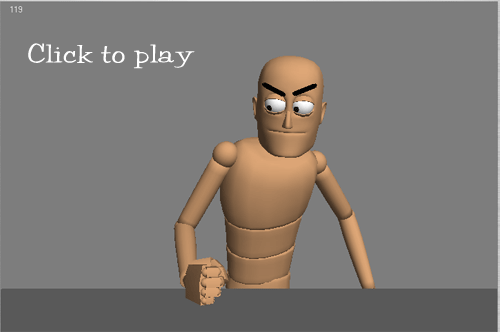
Oo, I like the hand out at 160-180 “spin your little web…”
I also like the last point at 260. Very sharp and emphatic.
The hand on the hip at 290 is pretty sassy. Tiny bit feminine maybe? Perhaps it’s the head tilt that does it.
Do more of these!
Wow … excellent posing and timing thus far on the body motion. I also like that last bit of pointing action he does.
I agree with Day Day that the hand on hips does seem slightly feminine. Maybe put both hands on hips? That might seem a little symmetrical though. His right arm kinda just disappears behind his body … don’t know if that’s a good or bad thing. Does the silhouette read well during this pose?
On a side note, I need to learn how to animate using this method. Seems like a speedier way to animate. Do you feel you work faster this way?
To echo Day Day again … do more of these!
Ate Day Day: Thanks for the crits! I’ll definitely look into the feminine posing during 290, hehe. I’m planning to post at least weekly, so hopefully this helps me keep at it. Also, it’ll be a good way to log my learning as I go along.
Hongman: Thanks also! You’re right about the silhouette thing, d’oh. I’m planning on reworking that pose anyway after seeing both of you guys’ crits on it.
As for workflow, I can definitely say that it’s easier for me, but it could be personal preference. I’m more inclined towards 2D animating, so doing this method makes me feel like I’m doing 2D again. I know that every key I make was my own, and that the PC didn’t do it for me so I become more conscious of what I’m doing. As for speed, I can see myself getting faster the more I use it; it’s intuitive, and easier to alter if someone suggests a different pose.
We’ll see though when I convert to spline and start polishing this. 😉
P.S. I’ve never seen It’s a Wonderful Life either 😛 I guess we should watch it